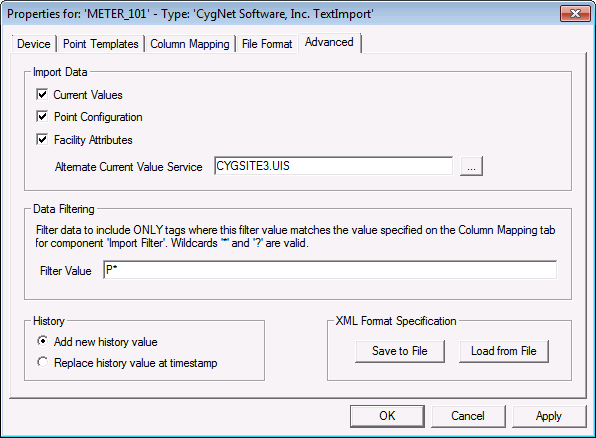
The properties on the Advanced page allow you to select what data to import, to filter data, to determine history import settings, and to save or load the Import and Column Mapping configuration to an XML file.
| Property | Description |
|---|---|
| Current Value |
Select to import current values, point configurations, facility attributes or any combination of the three. By default, both current values and point configurations are imported. |
| Point Configuration | |
| Facility Attribute | |
|
Alternate CVS |
The Text Import driver optionally allows current values, points, and/or facility attributes to be imported to a current value service other than the UIS associated with this DDS. See Bulk Tag Creation for information about setting an Alternate CVS. |
| Property | Description |
|---|---|
|
Filter Value |
The data on which to filter the import. Used in conjunction with the Import Filter component on the Column Mapping page. Wildcards ("*" and "?") can be used. See Filtering Data for more information. |
If importing partial historical data, it may be desirable to delete any existing values from the VHS before adding new ones. This is a slower process requiring a VHS read and delete for every value, so unless it is necessary, choose the default of adding new history values.
| Property | Description |
|---|---|
|
Add new history value |
Add new history values. This is the default. |
|
Replace history value at timestamp |
Delete existing history values. |
Click Save to File to save the device configuration to an XML definition file. Navigate to the desired file location, type the file name, and click Save.
Or click Load from File to import the device configuration from a previously saved XML definition file. Navigate to the desired file, select it, and click Open.

|
|
|

